How to Read a Crochet Pixel Chart from a Photo Pattern
Learn how to read and follow a crochet pixel chart from a photo. Complete guide to grid notation, colour symbols, and chart-reading tips.
How to Read a Crochet Pixel Chart from a Photo Pattern
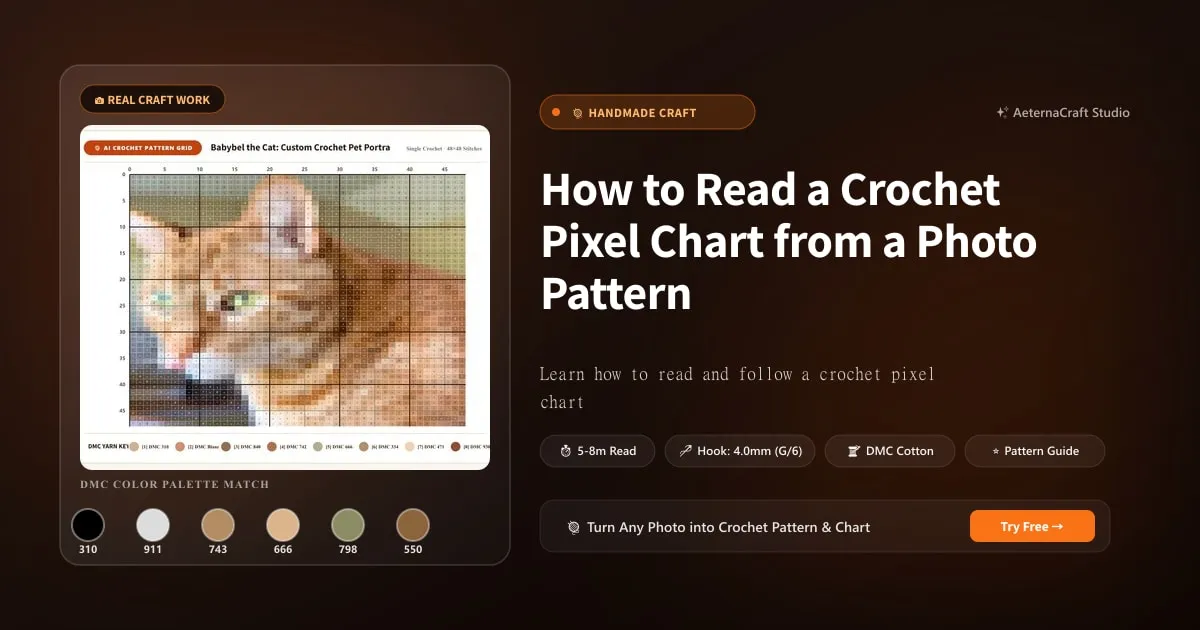
A crochet pixel chart is the visual map of your photo-to-crochet pattern. Each cell in the grid represents one stitch, and each colour represents a specific yarn shade. Learning to read this chart efficiently is the difference between a relaxing crochet session and a frustrating one.
Understanding Chart Anatomy
A photo-to-crochet pattern from AeternaCraft Studio includes three components:
- Colour Grid Chart: A visual grid where each cell is coloured to match its yarn shade. This is the primary reference.
- Colour Legend: A table listing each colour number (C1, C2, etc.), its hex code, suggested yarn shade, and estimated yardage.
- Row-by-Row Instructions: Written text directions for each row, listing colour changes and stitch counts.
How to Read a C2C Chart
C2C (corner-to-corner) charts are read diagonally:
- Start: Bottom-right corner of the grid
- Direction: Work diagonally from bottom-right to top-left
- Row structure: Each diagonal “row” increases in length until the midpoint, then decreases
- Reading order: Right-side rows are read right-to-left; wrong-side rows are read left-to-right
C2C chart reading example:
- Row 1: 1 block (bottom-right corner)
- Row 2: 2 blocks (diagonal)
- Row 3: 3 blocks (diagonal)
- Continue increasing until you reach the full width
- Then decrease back down to 1 block at the top-left corner
💡 Digital Companion Tools for Pixel Charts:
- Plan your multi-color yarn amounts accurately before purchasing skeins with our free C2C & Tapestry Yarn Calculator.
- Follow PDF charts and written lines without losing your spot on paper using our hands-free PDF Pattern & Row Tracker or clean up copied pattern text with our Crochet Pattern Reader & Cleaner.
How to Read a Single Crochet Chart
Single crochet charts are read horizontally:
- Start: Bottom-right of the grid (Row 1)
- Right-side rows (odd numbers): Read right to left
- Wrong-side rows (even numbers): Read left to right
- Direction: Work from bottom to top
Single crochet chart reading example:
- Row 1 (RS): Read right to left — C1, C1, C2, C2, C1, C1…
- Row 2 (WS): Read left to right — C1, C1, C3, C3, C2, C2…
- Continue alternating direction up the chart
The Colour Legend: Your Rosetta Stone
Before touching yarn, study the colour legend:
| Colour # | Hex Code | Suggested Yarn | Yardage |
|---|---|---|---|
| C1 | #F5F5DC | Cream | 120 yd |
| C2 | #8B4513 | Saddle Brown | 80 yd |
| C3 | #D2691E | Chocolate | 45 yd |
| C4 | #000000 | Black | 15 yd |
Prepare your bobbins: Wind each colour onto a separate bobbin and label it with the colour number. This prevents the most common mistake — using the wrong colour because two similar shades got mixed up.
As a yardage rule of thumb for single crochet at 5mm, each cell consumes about 0.08 yards of worsted yarn, so a 50x50 chart (2,500 cells) totals roughly 200 yards. A solid block of one colour eats its full share—a 10x10 area is 100 cells, or about 8 yards of that shade alone—so label every bobbin with both the colour number and the yards it holds. If your photo pattern doesn’t list per-colour yardage, drop the chart dimensions and your gauge into the amigurumi calculator to estimate how much of each colour to buy before you start winding.
Chart Reading Strategies
The Ruler Method
Place a ruler or straight edge under the row you’re currently working. This visually isolates your active row and prevents your eye from wandering to other rows.
The Highlighter Method
As you complete each row, colour over it with a highlighter on your printed chart. This gives you an immediate visual of progress and makes it obvious where you left off if you put the project down.
The Sticky Note Method
Cover everything above your current row with a sticky note. This is especially useful for large charts where the grid can be visually overwhelming.
The Digital Method
Open the chart PDF on a tablet and use a drawing app to mark completed rows. Zoom in for detail on individual cells — especially useful for patterns with 14+ colours where cells can be small.
Handling Colour Changes
Colour changes are the trickiest part of reading a pixel chart. Here’s how to manage them:
- Pre-read the row: Before starting a row, scan ahead to identify all colour changes. This lets you prepare bobbins in advance.
- Count stitches between changes: The row-by-row instructions tell you exactly how many stitches of each colour to make. Example: “C1 ×5, C2 ×3, C1 ×12, C3 ×2”
- Carry yarn loosely: When switching between two colours frequently, carry the unused yarn along the back of the work. Don’t pull it tight — it will distort the fabric.
- Use bobbins for large sections: If a colour appears in a cluster of 5+ stitches, use a separate bobbin. If it’s just 1–2 stitches, carry the yarn.
Common Chart-Reading Mistakes
- Reading in the wrong direction: Always check whether you’re on a right-side or wrong-side row. The direction alternates for single crochet.
- Confusing similar colours: Two shades of brown can look identical on a printed chart. Always cross-reference with the hex codes.
- Losing your place: This is the #1 source of errors. Use a ruler, highlighter, or sticky note system religiously.
- Skipping the legend: Don’t guess colour numbers — always check the legend. C3 in one pattern might be completely different from C3 in another.
- Ignoring row numbers: Row numbers are your checkpoint. If row 15 has 80 stitches and you count 78, something went wrong — fix it before continuing.
Tips for Large Charts
For grids of 100×120 or larger:
- Print in sections: Split the chart into quadrants and tape them together. This makes each section more readable.
- Use a magnifier: A stand magnifier helps distinguish similar colours on dense charts.
- Mark colour boundaries: Use a coloured pencil to draw lines between major colour sections. This creates visual landmarks.
- Work in sessions: Large charts are marathon projects. Set a goal of 5–10 rows per session rather than trying to do too much at once.
Practice with Real Patterns
The best way to learn chart reading is by doing. Start with a simple 60×60 pattern from our Gallery — the babybel cat portrait is a great beginner chart with clear colour boundaries and manageable complexity.
Frequently Asked Questions
How do I read a crochet pixel chart?
A crochet pixel chart is a grid where each cell represents one stitch and each colour represents a yarn shade. Read C2C charts diagonally from bottom-right to top-left. Read single crochet charts horizontally from bottom to top, right to left (right-side rows) or left to right (wrong-side rows).
What do the numbers and letters mean on a crochet chart?
Numbers on the edges indicate row/stitch counts. Letters or numbers inside cells (C1, C2, C3) refer to colours in the legend. Each symbol corresponds to a specific yarn shade listed in the colour legend section of your pattern PDF.
Can I crochet from a pixel chart without written instructions?
Yes, once you're comfortable reading charts. The chart contains all the information — colour placement and stitch count. Written row-by-row instructions are provided as a convenience but aren't strictly necessary if you can read the grid.
Related Posts
Photo to Crochet for Beginners: First Pattern Guide
New to photo-to-crochet? This beginner-friendly guide walks you through your first pattern — from choosing a photo to finishing your project.
ToolsPhoto-to-Crochet Pattern Mistakes: Common Fixes
Avoid the 10 most common photo-to-crochet pattern mistakes. Learn to prevent tension issues, colour confusion, grid miscounts, and finishing errors.
Try Our Free Crochet Tools
Turn Your Photo Into a Crochet Pattern
Upload any photo and our AI generates a pixel-perfect crochet pattern with real yarn color matching in seconds.
Try AeternaCraft Studio Free →Calculate Yarn for Any Resize
Free amigurumi yarn & resizing calculator. Change hook, switch yarn, or scale a whole pattern — instant results with PDF export.
Open the Calculator →