Photo to Crochet Pattern Generator: Complete 2026 Guide
Everything you need to know about photo-to-crochet pattern generators in 2026. Compare AI tools, learn the workflow, and choose the right generator.
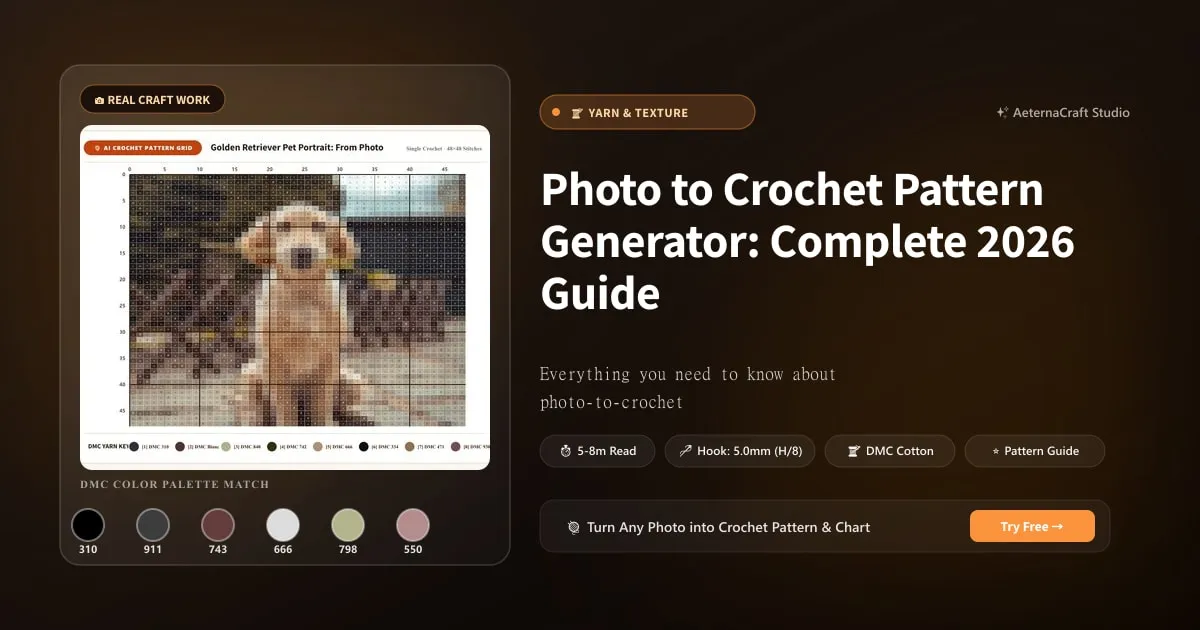
Photo to Crochet Pattern Generator: Complete 2026 Guide
The photo-to-crochet pattern generator has evolved from a niche curiosity to an essential tool for modern crocheters. In 2026, AI-powered generators can transform any photograph into a detailed, stitchable pattern in seconds — something that would have taken a designer hours of manual charting just a few years ago.
This guide covers everything you need to know: how the technology works, how to choose the right generator, and how to get the best results from your photo-to-crochet conversions.
How Photo-to-Crochet Generators Work
The process behind a photo-to-crochet generator involves three core steps:
1. Colour Quantisation
Your photo contains thousands of colours — far more than any crochet project could practically use. The generator applies a colour quantisation algorithm (typically K-means clustering) that reduces the image to your chosen number of colours (6–20). This process groups similar colours together and selects representative shades that best preserve the image’s visual identity.
2. Grid Downsampling
The photo is then resized to match your chosen grid dimensions. Each pixel in the downsampled image becomes one stitch in the final pattern. A 80×100 grid means 8,000 individual stitches, each with an assigned colour.
3. Yarn Mapping and Chart Generation
Each colour in the quantised palette is mapped to the nearest available yarn shade. The generator then creates:
- A colour grid chart (visual map of every stitch)
- A yarn legend (colour swatches with hex codes and suggested yarn brands)
- Row-by-row written instructions (text directions for each row)
Key Features to Look For in a Generator
When evaluating a photo-to-crochet pattern generator, consider these factors:
| Feature | Why It Matters |
|---|---|
| Colour count control | Lets you balance detail vs. difficulty |
| Grid size flexibility | Determines project scale and detail level |
| Stitch mode options | C2C and single crochet produce different textures |
| PDF export | Essential for printing and following patterns offline |
| Yarn brand matching | Saves time sourcing materials |
| Preview before download | Lets you test settings before committing |
| No watermark on output | Professional-quality patterns for selling |
AeternaCraft Studio: The 2026 Standard
AeternaCraft Studio is designed specifically for photo-to-crochet conversion, with features that address the real needs of crocheters:
- Instant generation: Patterns are ready in under 10 seconds
- Full format support: JPG, PNG, WebP up to 10 MB
- Flexible grid sizes: 40×40 to 150×150 stitches
- Colour count control: 6 to 20 colours
- Dual stitch modes: C2C (corner-to-corner) and single crochet
- Complete PDF export: Colour grid, legend, row-by-row instructions
- First pattern free: No signup, no credit card, no watermark
Comparing Generator Approaches
Not all photo-to-crochet tools work the same way. Here are the main approaches:
AI-Powered Generators (Recommended)
Tools like AeternaCraft Studio use machine learning to optimise colour quantisation for crochet-specific outcomes. The AI is trained to preserve facial features, fur textures, and important visual details during the downsampling process.
Best for: Pet portraits, landscapes, detailed photo patterns
Simple Pixelation Tools
Basic tools simply resize the image to a pixel grid without intelligent colour optimisation. They’re fast but produce flat, lifeless patterns that lose important details.
Best for: Simple logos, geometric designs
Manual Charting
Traditional method where a designer manually creates a grid chart from a photo. Extremely high quality but time-consuming and expensive.
Best for: Professional commissions, exhibition pieces
Getting the Best Results: Pro Tips
- Crop before uploading: Tight cropping on the subject improves detail retention
- Boost contrast: Slightly increasing contrast before upload helps the AI distinguish features
- Test multiple settings: Generate the same photo at 8, 12, and 16 colours to compare
- Match yarn to grid size: Smaller grids need thicker yarn (worsted); larger grids can use DK or sport weight
- Use the yarn legend: The hex codes help you match yarn shades precisely at the craft store
Common Questions About Photo-to-Crochet Generators
Can I sell items made from generated patterns? Yes — you own the finished piece and can sell it. The pattern itself is for your personal use.
Do I need to credit the generator? No credit is required for finished pieces made with AeternaCraft Studio patterns.
What’s the maximum photo file size? 10 MB. Most phone photos are 2–5 MB, well within the limit.
Can I generate patterns on mobile? Yes — Studio works in any modern mobile browser.
Start Generating Today
The fastest way to understand photo-to-crochet generation is to try it. Upload a photo to AeternaCraft Studio and see your image transformed into a crochet pattern in seconds. Your first pattern is completely free.
Browse our Gallery to see what’s possible — from pet portraits to landscapes to wearable art, all created from photos using the same generator you’ll be using.
Frequently Asked Questions
What is a photo-to-crochet pattern generator?
A photo-to-crochet pattern generator is an AI tool that converts any photograph into a stitchable crochet grid. It uses colour quantisation to reduce the photo to a limited palette, maps each colour to a yarn shade, and produces a row-by-row chart with full instructions.
Are photo-to-crochet pattern generators free?
AeternaCraft Studio offers your first pattern free, with no signup required. This includes the full colour grid, yarn legend, and PDF download. Additional patterns are available through affordable credits or subscription.
Can I use a photo-to-crochet generator for commercial projects?
Yes. Patterns generated through AeternaCraft Studio can be used for both personal and commercial projects. You own the physical finished piece and can sell it. The generated pattern itself is licensed for your personal use.
Related Posts
Turn Any Photo into a Pixel-Perfect Crochet Pattern
Turn any photo into a pixel-perfect crochet pattern with AI. Step-by-step guide to photo prep, colour quantisation, grid sizing, and stitch modes.
ToolsSelling Photo-to-Crochet Patterns: Profit Guide
Learn how to sell photo-to-crochet patterns and finished pieces. Covers pricing, platforms, copyright, and building a profitable crochet business.
Try Our Free Crochet Tools
Turn Your Photo Into a Crochet Pattern
Upload any photo and our AI generates a pixel-perfect crochet pattern with real yarn color matching in seconds.
Try AeternaCraft Studio Free →Calculate Yarn for Any Resize
Free amigurumi yarn & resizing calculator. Change hook, switch yarn, or scale a whole pattern — instant results with PDF export.
Open the Calculator →